
Forwarding Google Search Emails
We often get emails to the [email protected] email address from Google Search Console. They contain error messages that should be checked out for sites. Below is the process for handling these.
- Forward any Google Search-related email to “[email protected]”.
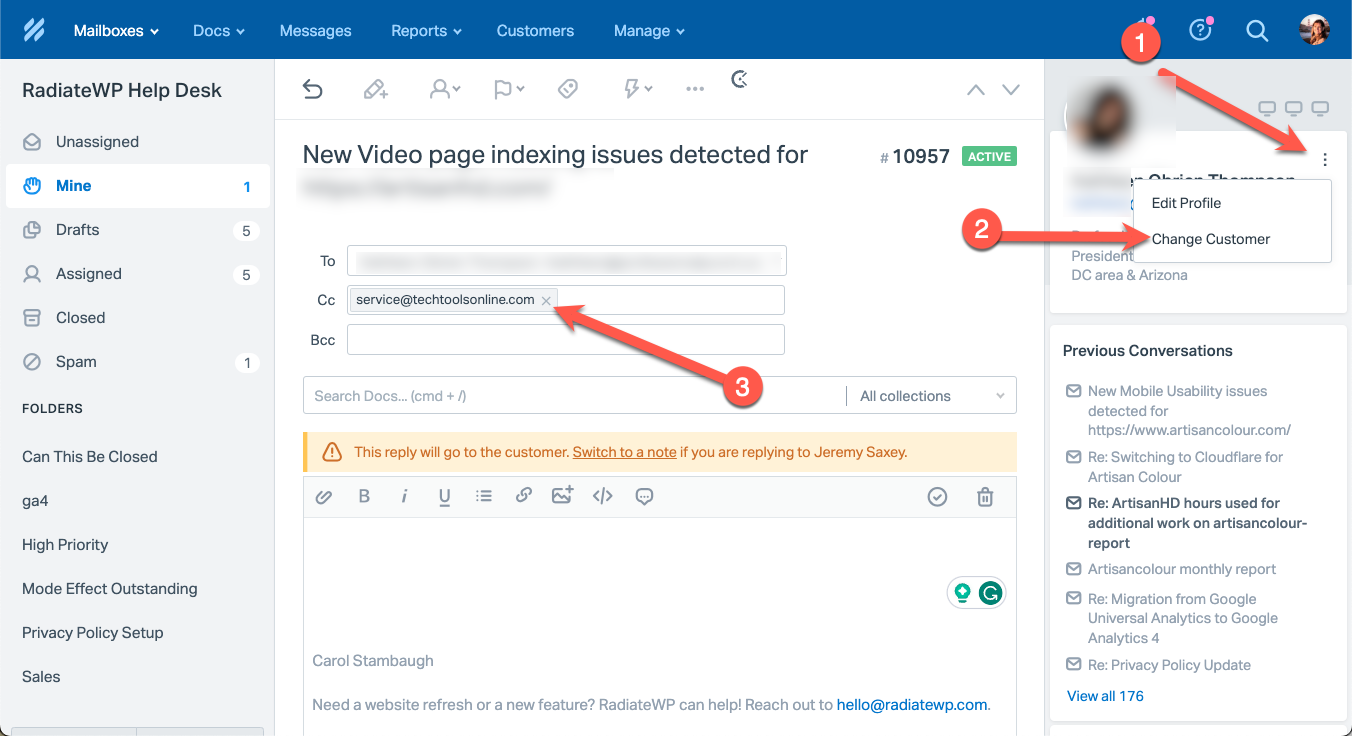
- Go to Help Scout and go to that ticket and click “Change Customer” (2) by clicking on the dots (1) at the top right and then click change customer. Select the appropriate client.
- If [email protected] is showing as a CC, delete it. (3)
- Click the Saved Replies button and search for “Google Search Console Email” saved reply and click to insert the saved reply.
- The saved reply including the client’s name will be inserted.
- Send the message and then close the ticket. The ticket will reopen if they reply.
Multiple Emails to the same client (Merge the tickets into one before sending)
- Please don’t send multiple emails to the same person.
- If you have multiple emails to the same client, then add a note to the first message, and in that note list the ticket number(s) and/or link(s) to the other Google messages that need to be looked at for this client.